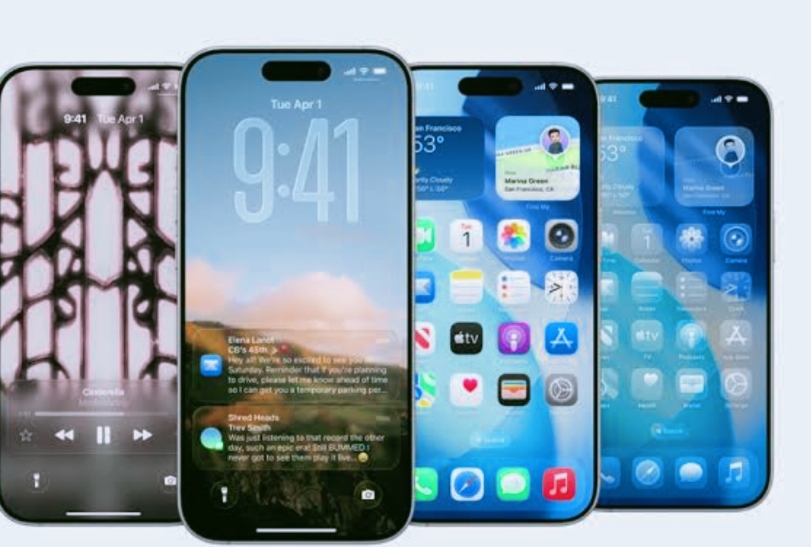
Today, Apple unveiled iOS 26 during its annual Worldwide Developers Conference (WWDC), highlighting a significant software update that comes with a fresh new design, enhanced features driven by Apple Intelligence, and key improvements to well-loved apps.
The revamped interface, featuring a lively “Liquid Glass” effect, offers iOS a vibrant and expressive appearance while keeping that familiar vibe. iOS 26 also enhances communication with updated Phone and Messages apps, adds more customization options for the Lock Screen and Home Screen, and boosts the capabilities of CarPlay, Apple Music, Maps, and Wallet.
At the heart of iOS 26 lies Apple Intelligence, which brings forth new features such as live translation, visual intelligence, enhanced Siri shortcuts, and additional methods for self-expression through Genmoji and AI-generated images.
Apple has also introduced a new Apple Games app and included some cool features for AirPods. iOS 26 is set to drop this fall along with updates for iPadOS 26 and macOS 26.
iPhones that are compatible with iOS 16.
Here’s the complete list of iPhones that will be able to run iOS 26:
- iPhone 16e
- iPhone 16 & 16 Plus
- iPhone 16 Pro & 16 Pro Max
- iPhone 15
- iPhone 15 Plus
- iPhone 15 Pro & 15 Pro Max
- iPhone 14 & 14 Plus
- iPhone 14 Pro
- iPhone 14 Pro Max
- iPhone 13 & 13 mini
- iPhone 13 Pro & 13 Pro Max
- iPhone 12 & 12 mini
- iPhone 12 Pro & 12 Pro Max
- iPhone 11
- iPhone 11 Pro & 11 Pro Max
- iPhone SE (2nd gen & newer)
It’s important for readers to know that the detailed features of Apple Intelligence need supported devices, which are all iPhone 16 models, along with the iPhone 15 Pro and iPhone 15 Pro Max.
iOS 26 Now Available
All the new features of iOS 26 can be tested starting today by developers via the Apple Developer Program at developer.apple.com
Next month, everyone can check out the public beta version at beta.apple.com
iOS 26 Has All Features
As noted earlier, iOS 26 brings a revamped interface made with Liquid Glass, a fresh translucent material that enhances depth and liveliness throughout the system. This includes new app icons, widgets, navigation elements, and controls. The Lock Screen now showcases a dynamic time display that smoothly adapts to the background images, and the spatial wallpapers respond with gentle 3D movement when users tilt their devices.
The Home Screen is getting a makeover, becoming more expressive with fresh options for customizing app icons and widgets. It now features a sleek design that adjusts to its surroundings. Major apps like Camera, Photos, Safari, and Apple Music have been visually enhanced to showcase content better and make navigation easier, providing a more immersive experience.
With Apple Intelligence embedded throughout iOS 26,Users can enjoy Live Translation in Messages, FaceTime, and Phone. This means you can translate audio and text conversations in real-time right on your device.
Visual intelligence enhances this ability by allowing users to search and engage with content displayed on their screens, like asking relevant questions or pinpointing and saving event information.
Genmoji and Image Playground bring fresh ways to express oneself, enabling users to craft completely new emojis and visuals by merging text with images.
Apple Intelligence also fuels smart suggestions across various apps, ranging from shortcuts and writing aids to automatic order tracking, and is now available to developers via a new Foundation Models framework.
Communication gets a significant upgrade with the Phone app, which now has a new unified layout that merges Favorites, Recents, and Voicemails into one sleek view.
Call Screening utilizes real-time voice input to give users context before they choose to pick up a call, while Hold Assist takes care of waiting for the user and alerts them when a live agent is back.
In Messages, users can now filter messages from unknown senders, which are sorted into a separate folder for later review.
Conversations can be personalized with custom backgrounds, and users have the option to create and share polls, with smart suggestions from Apple Intelligence on when a poll could be useful.
Apple Cash integration has been enhanced, and typing indicators are now a feature in group chats.
CarPlay
CarPlay is getting some cool updates in iOS 26, featuring a smoother call interface that lets you see who’s calling without messing up your navigation. Plus, Messages in CarPlay now include Tapbacks and pinned chats, and there are new widgets and Live Activities to keep you updated without any distractions.
CarPlay Ultra takes things up a notch by offering better integration between your iPhone and the car, merging controls and displays across all screens for a more cohesive and immersive driving experience.
Apple Music
Apple Music is becoming smarter and more user-friendly with Lyrics Translation and Pronunciation, making it easier for users to understand and sing along to songs in various languages. And with AutoMix, you get smooth DJ-style transitions between tracks, thanks to AI that matches beats and adjusts timing.
Apple Maps
In Apple Maps, users can now check out Visited Places, which is a safe and private record of the spots they’ve visited, plus it offers smarter route suggestions tailored to their daily habits and real-time traffic info.
Apple Wallet
Apple Wallet is getting some cool new features, like the ability to handle installment payments and rewards for Apple Pay transactions. Also, boarding passes now show Live Activities and work directly with Maps and Find My to provide better travel assistance.
Apple Games
The brand new Apple Games app provides a single place to find, play, and keep track of games on your iPhone. It highlights current events and updates for your favorite games and works perfectly with Apple Arcade, making for a more connected and social gaming experience. AirPods are now even more useful, offering studio-quality audio recording and camera remote control through stem gestures.
Voice Isolation boosts call clarity even more, particularly in loud settings.
Family features are improved with an easier setup for child accounts and wider parental controls, which include communication approvals, blurred sensitive content in FaceTime and shared photos, plus flexible app permissions based on age.
Safari now offers enhanced fingerprinting protection for safer browsing by default.
Accessibility has been greatly expanded with new tools such as Accessibility Reader for tailored reading experiences and Braille Access for smooth integration with braille displays. Updates to Live Listen, Background Sounds, and Personal Voice keep Apple devices inclusive for everyone.
- FIFA World Cup 2026: How Fans Can Watch Matches For Free
- YouTube Relaunches Private Chats With Age Verification
- The Future Of Air Travel: Why The 100ml Liquid Limit May Soon Disappear
- Rising Temperatures, Rising Tempers? The Surprising Link Between Heat And Aggression
- India’s Lost Dragonfly Returns After 110 Years
- Snapchat Introduces Safer Story Sharing For Under-16 Users
- Google Launches Gemini 3.5 Live Translate
- The New Dating Trend Everyone’s Talking About: Puffer-Fishing
- Tea, Coffee, Juice: The Worst Empty Stomach Mistakes
- Instagram Introduces Profile Grid Customization
- Skywatchers Alert: Jupiter And Venus Set For A Rare Close Encounter Tonight
- Chrome Just Downloaded a 4GB AI Model? Here’s How to Delete It
- Why Does Real Love Feel Different Than We Expect?
- The 30-Minute Parenting Secret Every Child Needs
- Remote Robotics: Control Robotic Arms From Your Smartphone
- Mumbai’s Pod Taxis: Will BKC Benefit?
- Beyond The Missing Period: Understanding MRKH Syndrome
- Why Calling Every Stomach Problem ‘Gas’ Can Be Risky?
- Poke: Apple’s First AI Agent Debuts
- AC Drying Out Your Skin? Try This Simple Fix
- Want More Fireflies? Transform Your Garden Today
- Spotify Launches Podcast Clips For Instant Highlight Saving
- The Hidden Reason Summer Causes More Headaches
- Early Iron Deficiency Symptoms You Shouldn’t Ignore
- Meta Introduces Premium ‘Plus’ Tier For Instagram, Facebook And WhatsApp


Leave a Reply