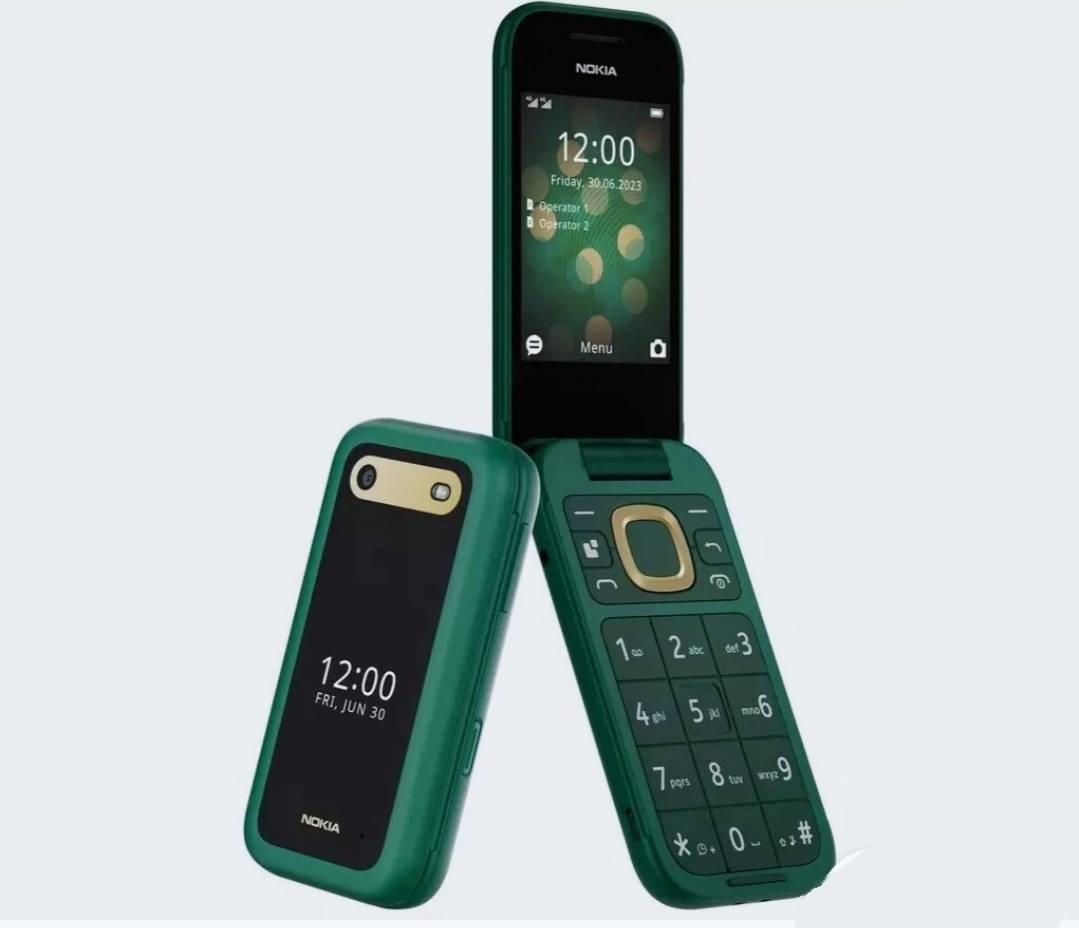
Nokia 2660 Flip stands out as a refreshing alternative in a world dominated by smartphones. It brings users back to the basics of communication while still including modern connectivity options that connect the old school flip phone experience with what people expect today. This device shows that progress in technology doesn’t have to mean more complexity – rather, it emphasizes reliability, user friendliness, and practical features that attract a wide range of users looking for something different from the smartphone norm.
Nokia has crafted the 2660 Flip with a deep appreciation for the classic flip phone style, blending it with modern materials and enhanced build quality.
This device highlights the satisfying mechanical action that made flip phones a cultural staple, featuring a hinge mechanism that operates smoothly and offers tactile feedback that you just can’t get from modern touchscreen devices. When closed, its compact design makes it super portable, fitting easily in pockets without the bulkiness that comes with today’s smartphones.
The external display of the Nokia 2660 Flip allows you to see important information without needing to open the phone, showing incoming calls, messages, and basic status updates. The color choices cater to both classic and modern tastes, with finishes that keep a professional look while allowing for personal expression.
The overall build quality reflects Nokia’s renowned durability, using materials that can handle everyday use and the occasional drop that might worry smartphone users.
Display Setup
The 2660 Flip comes with a dual display setup that enhances functionality while keeping the classic flip phone vibe. The main internal display offers enough screen space for texting, managing contacts, and using basic apps, with clear visibility that stays readable in different lighting. The color quality is good for basic multimedia viewing, but keep in mind that the device is primarily focused on communication.
The external display acts as a handy info center, letting users check notifications, the time, and caller ID without needing to open the device. This setup boosts battery efficiency while delivering key features that improve the user experience. The brightness of the display adjusts to different surroundings, ensuring good visibility without draining too much power, which helps maintain the device’s impressive battery life.
Keypad Experience
The physical T9 keypad is one of the 2660 Flip’s standout features for those who enjoy tactile input. Each key gives satisfying feedback, making typing feel intentional and precise, especially compared to the occasional annoyances of touchscreen typing. The layout of the keypad sticks to familiar patterns that users of previous flip phones will recognize right away.
T9 predictive text input has been fine-tuned to align with today’s communication habits, adapting to user preferences and common word pairings to speed up typing.
The navigation keys allow for easy control of the menu system, while the dedicated call and end buttons provide quick access to essential phone functions.
Plus, the keypad backlighting makes it usable in dim lighting without draining the battery too much.
Connectivity And Features
Even though it looks traditional, the 2660 Flip comes with 4G connectivity, making it compatible with today’s network infrastructure and ensuring reliable data connections for basic internet use. This means you can do things like web browsing, check your email, and download apps via the KaiOS platform, which helps connect the dots between old school phones.
Wi-Fi connectivity gives users more options, especially if you want to save on cellular data while using online services. The device is compatible with popular messaging apps and social media platforms.
Plus, GPS functionality allows for location services and basic navigation, but keep in mind that the device’s display and processing power set some limits.
Camera Functionality
The 2660 Flip features a basic camera system that meets everyday photography needs just fine, although the image quality isn’t on par with what you’d expect from a smartphone.
It’s good for practical tasks like capturing documents, taking quick snapshots, and recording basic videos, with results that are more than adequate for sharing on social media and keeping personal memories, especially in good lighting.
You can also enjoy multimedia playback for music and simple video content, with audio quality that’s surprisingly good for casual listening.
The built-in FM radio offers entertainment options that don’t need data, which is great for those who still enjoy traditional broadcast media.
Plus, you can expand storage with microSD cards, letting you carry a decent music library and personal files.
Battery Life
The 2660 Flip’s battery performance stands out as one of its key strengths, offering multi day usage that alleviates the charging worries typical among smartphone users.
This impressive battery life makes the device especially attractive for travel, emergency situations, and for those who like to keep their charging to a minimum.
The charging process utilizes standard micro USB connectivity, which guarantees compatibility with commonly available cables and chargers.
The device effectively provides reliable communication capabilities while proving that modern technology can harmonize with simplified user experiences, making it an attractive choice for those who value essential features over extensive digital ecosystems.
- The Future Of Air Travel: Why The 100ml Liquid Limit May Soon Disappear
- Rising Temperatures, Rising Tempers? The Surprising Link Between Heat And Aggression
- India’s Lost Dragonfly Returns After 110 Years
- Snapchat Introduces Safer Story Sharing For Under-16 Users
- Google Launches Gemini 3.5 Live Translate
- The New Dating Trend Everyone’s Talking About: Puffer-Fishing
- Tea, Coffee, Juice: The Worst Empty Stomach Mistakes
- Instagram Introduces Profile Grid Customization
- Skywatchers Alert: Jupiter And Venus Set For A Rare Close Encounter Tonight
- Chrome Just Downloaded a 4GB AI Model? Here’s How to Delete It
- Why Does Real Love Feel Different Than We Expect?
- The 30-Minute Parenting Secret Every Child Needs
- Remote Robotics: Control Robotic Arms From Your Smartphone
- Mumbai’s Pod Taxis: Will BKC Benefit?
- Beyond The Missing Period: Understanding MRKH Syndrome
- Why Calling Every Stomach Problem ‘Gas’ Can Be Risky?
- Poke: Apple’s First AI Agent Debuts
- AC Drying Out Your Skin? Try This Simple Fix
- Want More Fireflies? Transform Your Garden Today
- Spotify Launches Podcast Clips For Instant Highlight Saving
- The Hidden Reason Summer Causes More Headaches
- Early Iron Deficiency Symptoms You Shouldn’t Ignore
- Meta Introduces Premium ‘Plus’ Tier For Instagram, Facebook And WhatsApp
- WhatsApp Launches Channel Status For 24-Hour Admin Updates
- 5 Powerful Signs You’re With The Right Person
- Social Media: The New Smoking For Children?
- Dewy, Glossy, Sweaty: The Viral Makeup Trend Everyone’s Trying
- Luna Launches Smart AI Band For Real-Time Daily Planning
- Meta Launches New ‘Forum’ App
- Why Is Your C-Section Scar Vertical?
- Red vs Orange Heat Alerts: Which One Puts Your Body At Greater Risk?
- Does AC Sleep Weaken Your Immunity? – Myth or Fact?
- The Rise Of Nonnamaxxing
- How To Clean Mushrooms Without Turning Them Soggy?
- How Hot Nights Quietly Harm Your Sleep And Heart?
- Indian Content Creators Can Win a Free Nepal Trip — Here’s How To Apply
- Gemini Omni Flash Brings Multimodal AI Video Creation To Google
- Essential Oil Diffusers: Healthy Trend or Hidden Hazard?
- Gmail Users Alert: Your Free 15 GB Storage Could Disappear
- YouTube Introduces Likeness Detection For 18+ Users
- AI vs Human Language: Is Learning Still Worth It?
- OpenAI Unveils ChatGPT Finance Tools With Direct Bank Integration
- The Ageing Risk Of Sleeping Too Much Or Too Little
- Fitness or Future Pain? The Truth About Joint-Damaging Workouts
- Salt Water Trend: What You Need To Know First?
- X Launches History Tab For Likes, Bookmarks And Videos
- Stay Chill: Smart Gadgets For Summer
- Instagram Launches Instant For Disappearing Photos
- ChatGPT App Now Supports Codex Coding Tool
- Best Smart Devices For Senior Citizens
- Why Did Humans Use To Eat Soil, And Why Do Some Still Do?
- How Your Body Responds To Sleep Deprivation
- Glow Naturally: Simple Habits For Healthier Skin
- Google Chrome Too Messy? Easy Tricks For Smoother Browsing
- Faustino Oro Becomes Chess’s Second-Youngest Grandmaster
- The World’s First Railway: Where It Began?
- Google Upgrades Cars With Gemini AI
- The Hidden Warning On Your Skin: Early Signs Of Diabetic Rash
- Amazon Launches Vertical Feed For Prime Video
- Say Goodbye To Mosquitoes Naturally With These 6 Plants
- Puffy Face? Simple Ways To De-Puff Your Face
- Google Launches Fitbit Air: A New Era In Sleep And Recovery Tracking Begins
- Planning A Trip To Rudranath Temple? Here’s The Complete Reopening Guide
- Japan’s Simple Secrets To Heart Health
- Ube Coffee: Trendy Treat or Overhyped Drink?
- Don’t Ignore These AC Warning Signs
- Thinking About Them Nonstop? The Rise Of Limerence
- The Rise Of The ‘Ick’ In Modern Dating
- Step By Step: The Simple Habit That Lowers Blood Pressure Fast
- Galaxy AI Glasses Official, Samsung Teases Earbuds Upgrade
- What Rice Water Really Does To Your Skin Overnight?


Leave a Reply